
My child cannot read – what should I do?
You should always start at the top of the exercise set, i.e. with “Recognizing at a glance.” In the first 5-10 exercises, it makes sense to work in “Supervised” mode “Supervised” mode in order to make a basic diagnosis for the child being supervised (e.g., how many letters can the child recognize at a glance, how much time does the child need to pronounce what they see, can they make the eye jump, how much time does the child need to recall what they see from memory, etc.). The exercises used for diagnosis are also used for therapy, i.e., not every word list in the program needs to be worked through.
Example: The child can reliably recognize the letters b and d, so the word lists for b and d no longer need to be practiced; move on to the next exercise.
Easy-to-use user interface
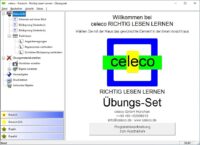
You don’t need in-depth knowledge of reading disorder therapy or special computer skills to use the celeco method effectively.
The program is based on the Windows Explorer user interface:
The program contents are displayed in a tree structure in the left window, while details of the selected program item are shown in the right window.
The width of both windows can be adjusted by clicking and dragging the window divider bar with the left mouse button held down. Clicking on a plus sign opens the next level of detail, while clicking on a minus sign in the tree closes a level of detail.